
 Inspector
Hover a contract address.
See what it is.
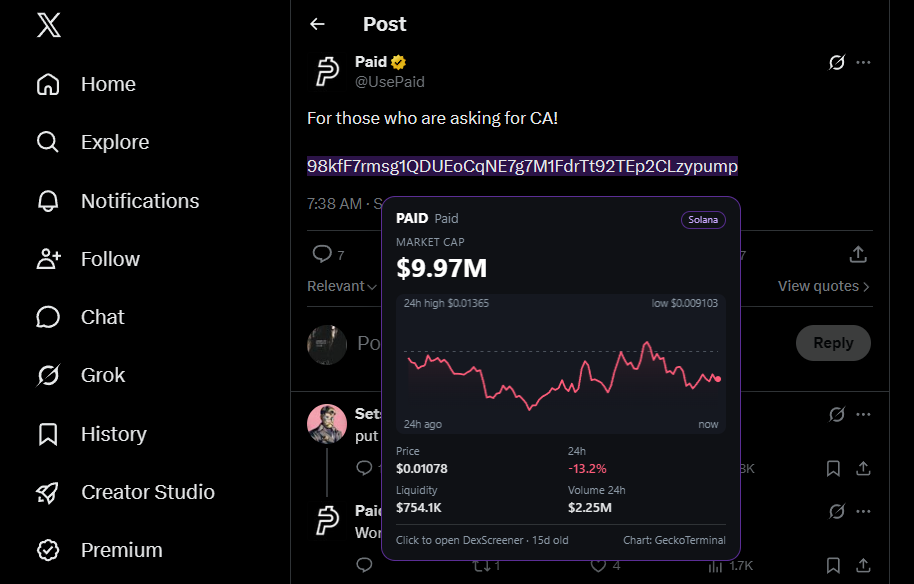
Inspector is a small Chrome extension that scans Solana contract addresses on X. Rest your mouse on one and it shows the market cap and a 24 hour chart. Click it and the token opens on DexScreener.
It isn’t on the Chrome Web Store, so you add it by hand. Takes about a minute.
what you see when you hover
What it does
- Only reacts when you hover. It doesn’t underline anything or change the page. Nothing happens until your mouse rests on an address.
- Shows the basics. Market cap, price, 24h change, liquidity, volume and a 24 hour chart.
- Click to open. The address opens on DexScreener in a new tab.
- Says so when it can’t find anything. A wallet address, or a token that’s too new to be listed yet, just gets a short message.
Install
- Download the zip and unzip it somewhere you’ll keep it. Chrome reads the folder in place, so don’t delete it afterwards.
- Open
chrome://extensionsand switch on Developer mode (top right). - Click Load unpacked and pick the unzipped folder.
- Open X and hover a Solana address.
Chrome may show a “disable developer mode extensions” prompt when it starts. That’s normal for anything installed this way. To update, download the new zip, replace the folder and press the reload icon on the extension.
What it can see
Inspector is read-only. It can’t connect to a wallet, sign anything or ask for keys, and it never will.
- It runs on
x.comandtwitter.com, to find addresses under your cursor. - It talks to
api.dexscreener.comandapi.geckoterminal.comfor market data and the chart. - It remembers one setting, on or off, in your browser.
The only thing sent anywhere is the address you’re hovering (and the pool address for its chart), and it goes to those two sites. No accounts, no analytics, no tracking, nothing sent to me. The files in the zip aren’t minified, so you can read every line.
Check your download
SHA-256 of inspector.zip:
86d0b3f84da7aafa38494ccea52a50f32db4e467d0bcf6cc46286605804d884a Windows: certutil -hashfile inspector.zip SHA256
Mac / Linux: shasum -a 256 inspector.zip
Good to know
- Why isn’t it on the Chrome Web Store?
- Not yet. Until then it’s a manual install.
- Which browsers?
- Built for Chrome. Chromium browsers like Brave and Edge should work the same way.
- Where does the data come from?
- DexScreener and GeckoTerminal’s public APIs. Their data can be late or wrong, and brand new tokens often aren’t listed yet.